Willkommen Gast. Bitte
Einloggen
oder
Registrieren
Sprache wählen:
English
German
Last Script Version: 25
Übersicht
Hilfe
Suchen
Einloggen
Registrieren
PHP-Web-Stat Support Forum
›
Board (English)
›
English board
› Stats counter behaviour
‹
Vorheriges Thema
|
Nächstes Thema
›
Seiten: 1
Stats counter behaviour (Gelesen: 701 mal)
Doodle
YaBB Newbies
Offline
Beiträge: 9
Stats counter behaviour
21.12.25 um 14:35:59
Hi
The Webstats script has strange behaviour. The counter for today as an example, shows 11 visitors, but if you click 'Today' to look at visitors per hour, it adds up to 23, which is correct, and that's what Google analytics shows.
It seems to do this every single day. I even removed all of the bots agent value in "Exclude Bots" but that didn't make a difference.
The tracking code is in every single webpage, so I don't understand a deficit of 12 visits.
Zum Seitenanfang
IP gespeichert
Doodle
YaBB Newbies
Offline
Beiträge: 9
Re: Stats counter behaviour
Antwort #1 -
28.12.25 um 15:11:24
Update:
Stat counter is getting worse. It only updates online users, the rest of the stats get stuck and do not update, despite having the script set to fully update every 15 minutes.
It's extremely unreliable and misses about 40% of the visitors to my site. It's not worth having due to the unreliability of it.
Luckily, I only wasted £3 on the extra stats, otherwise I'd ask for a refund.
Zum Seitenanfang
IP gespeichert
De Hout
YaBB Newbies
Offline
Beiträge: 38
Alkmaar, Netherlands
Geschlecht:
Re: Stats counter behaviour
Antwort #2 -
31.12.25 um 23:16:40
It's unfortunate that it's not working. This is not normal behaviour for the stat.
There could be many causes, but you haven't provided much information.
- What is the URL of your website?
- Which PHP version are you using?
- Is the server time correct? (see general settings)
- Have you tried performing a “logfile repair” in the admin center?
With the above information, it may be possible to identify the cause.
Zum Seitenanfang
Derk
https://www.alkmaarweer.nl/
IP gespeichert
Doodle
YaBB Newbies
Offline
Beiträge: 9
Re: Stats counter behaviour
Antwort #3 -
06.01.26 um 13:25:16
De Hout schrieb
am 31.12.25 um 23:16:40:
It's unfortunate that it's not working. This is not normal behaviour for the stat.
There could be many causes, but you haven't provided much information.
- What is the URL of your website?
- Which PHP version are you using?
- Is the server time correct? (see general settings)
- Have you tried performing a “logfile repair” in the admin center?
With the above information, it may be possible to identify the cause.
Not going to post my site publicly
PHP 8.4.15
Server time is 100% correct
I don't see a "logfile repair" anywhere in the Admin settings
https://ibb.co/3Y0JjDk3
It shows today as having 18 visitors, yet the total when clicking "Today" adds up to 31, which is what Google Analytics shows.
By the end of day, PHP stat shows about 30 less visitors than GA. A few days back, it was 60 less.
Zum Seitenanfang
IP gespeichert
De Hout
YaBB Newbies
Offline
Beiträge: 38
Alkmaar, Netherlands
Geschlecht:
Re: Stats counter behaviour
Antwort #4 -
10.01.26 um 21:02:51
Doodle schrieb
am 06.01.26 um 13:25:16:
Not going to post my site publicly
PHP 8.4.15
Server time is 100% correct
I don't see a "logfile repair" anywhere in the Admin settings
It shows today as having 18 visitors, yet the total when clicking "Today" adds up to 31, which is what Google Analytics shows.
By the end of day, PHP stat shows about 30 less visitors than GA. A few days back, it was 60 less.
1. No problem.
2. Check. The stats script is thoroughly tested with PHP version 8.4.15 and is even compatible with PHP 8.5.
3. Check.
4. See the screenshot below.
5. After you’ve checked the log files, I recommend performing Recreate Index and Recreate Cache. Afterwards, don’t forget to switch maintenance mode off.
6. Advanced Settings → General → Check “Show error messages” and check your php-errors.log after a while.
7. It could be an SQL database issue, if you use one. I can’t test that — there is no SQL on my home server.
If the above recommendations don’t work, I’m out of options, I’m afraid.
In that case, try sending a PM to Holger (one of the programmers) for official support.
I also use Google Analytics, but I’ve never compared them.
Zum Seitenanfang
Derk
https://www.alkmaarweer.nl/
IP gespeichert
Doodle
YaBB Newbies
Offline
Beiträge: 9
Re: Stats counter behaviour
Antwort #5 -
11.01.26 um 00:48:09
De Hout schrieb
am 10.01.26 um 21:02:51:
1. No problem.
2. Check. The stats script is thoroughly tested with PHP version 8.4.15 and is even compatible with PHP 8.5.
3. Check.
4. See the screenshot below.
5. After you’ve checked the log files, I recommend performing Recreate Index and Recreate Cache. Afterwards, don’t forget to switch maintenance mode off.
6. Advanced Settings → General → Check “Show error messages” and check your php-errors.log after a while.
7. It could be an SQL database issue, if you use one. I can’t test that — there is no SQL on my home server.
If the above recommendations don’t work, I’m out of options, I’m afraid.
In that case, try sending a PM to Holger (one of the programmers) for official support.
I also use Google Analytics, but I’ve never compared them.
https://www.alkmaarweer.nl/downloads/Screenshot_2026-01-10_201834.png
I don't have those options available
Here's another image
https://ibb.co/KjPpKBts
I've marked the numbers in purple
In the overview, it says today is'46' and visitors this month 01/10 says '46'
But when you click 'Today' the stats say it's '53', and it even adds up to 53 when you count the visitors by hour.
It does this every single day.
It's rather ambiguous for the same script to return different totals for the same metric.
Zum Seitenanfang
IP gespeichert
De Hout
YaBB Newbies
Offline
Beiträge: 38
Alkmaar, Netherlands
Geschlecht:
Re: Stats counter behaviour
Antwort #6 -
11.01.26 um 13:23:37
Based on your screenshot, you are using the SQL database. That is why the Logfile repair option is not visible, because in this case you do not have any log files with the .txt extension.
So something seems wrong with the queries that the stats uses to retrieve data from the database.
I have no idea whether this is due to the stats script or the database, because I have zero experience with SQL.
What you can do is install a second stats installation in a new folder, choosing ‘Logging into Textfiles’ during setup. This is a one-time choice you have to make; you cannot switch between versions once you have made your choice.
You then place a second script on your web pages that detects visitors. Because two parallel stats are running, you can compare the two stats versions.
Zum Seitenanfang
Derk
https://www.alkmaarweer.nl/
IP gespeichert
John Motyer
Junior Member
Offline
Beiträge: 75
Burlington (Toronto), Canada
Geschlecht:
Re: Stats counter behaviour
Antwort #7 -
11.01.26 um 13:29:44
Doodle schrieb
am 11.01.26 um 00:48:09:
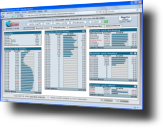
I don't have those options available
Doodle,
Although this doesn't help find or solve your problem, it seems that the reason you can't see the
Logfile Repair
option, is that you're using the
database
method with your installation (see menu on the
left
in my screenshot below), whereas Derk and I are using the
text file
method (see menu on the
right
in my screenshot below), hence you not having the option for
Logfile Repair
.
I understand your frustration, but unfortunately I can't offer any further suggestions.
Regards,
John
Zum Seitenanfang
My phpWebStats:
|
AuroraWings
|
FusionWings
|
FusionWings Galleries
| +7 more
IP gespeichert
Seiten: 1
‹
Vorheriges Thema
|
Nächstes Thema
›
Foren Sprung »
Übersicht
» 10 neueste Beiträge
» 10 neueste Themen
Allgemein
- Ankündigungen und Nachrichten
- Forumsregeln
- Versionshistorie
- Updateanleitungen
- Dokumentationen
Board (Deutsch)
- Bekannte Probleme
- Häufig auftretende Probleme mit Lösungen
- Probleme & Fragen
- Vorschläge & Codeschnipsel
- Weiterführende Diskussionen
Board (English)
- General and announcements
- Versionhistory
- Update instructions
- English board ««
Board (Turkish)
PHP-Web-Stat Support Forum
» Powered by
YaBB 2.5.2
!
YaBB Forum Software
© 2000-2012. Alle Rechte vorbehalten.


 Übersicht
 Seiten: 1


